How to Use an Existing Coax Cable to Get Internet to an Outbuilding (MoCA Guide)
Turn the coax cable already running to your barn, shed, or ADU into a 2.5 Gbps ethernet link with MoCA. Gear picks, install, and troubleshooting.
If there's already a coax cable running from your house to your barn, shed, or ADU — left over from an old satellite dish, a previous cable-TV install, or run by a contractor who didn't think about networking — you already have everything you need for gigabit+ internet between the two buildings. You just need a pair of MoCA adapters.
MoCA (Multimedia over Coax Alliance) is the boring, reliable, "I can't believe this works so well" technology that pushes ethernet traffic over existing TV coax. The current generation (MoCA 2.5) delivers up to 2.5 Gbps real-world, handles distances up to ~1000 ft of coax, and doesn't care about line of sight, weather, or RF interference. If you have the coax, this is the easiest install on the whole site.
Is MoCA the right answer?
- Coax cable already runs between the two buildings. Even if it isn't hooked up to anything. Dead satellite runs count. Old cable-TV runs count.
- You want gigabit+ throughput with almost zero install work.
- You don't want to deal with line of sight, aiming, or weatherproofing outdoor radios.
- No coax exists between the buildings. Pulling new coax just to run MoCA makes no sense — you'd run ethernet or fiber instead. MoCA only beats ethernet when the cable is already in the ground.
- The coax run is badly degraded. Deep nicks from weed-whackers, water-logged buried coax, or coax spliced through five different barrel connectors can kill the signal. We cover diagnostics below.
- You need more than ~1000 ft of cable between the buildings. MoCA signal degrades past that.
How MoCA works (90 seconds)
MoCA adapters are small boxes with two connectors: one coax in (F-type) and one ethernet out (RJ45). You plug one on each end of your existing coax, connect each adapter's ethernet port to your network, and the two adapters silently carry ethernet traffic over the coax using frequencies above the TV/cable-internet band.
You don't have to disconnect anything else on the coax. MoCA coexists with cable TV service, cable internet modems, and satellite TV (with the right splitters). You just need to make sure the coax path between your two adapters is continuous.
The gear
The adapters: ScreenBeam Bonded MoCA 2.5 (2-Pack)
Actiontec's ScreenBeam ECB7250K02 is the default pick. MoCA 2.5 bonded, 2.5 Gbps ethernet port, both ends in one box. There are other MoCA 2.5 brands (goCoax, Motorola), but ScreenBeam is what most people end up on — it's the cheapest way to buy a proper 2-adapter kit from a brand that will still be around for firmware updates.
Actiontec ScreenBeam Bonded MoCA 2.5 Adapter, 2-Pack (ECB7250K02)
Turn existing coax into a 2.5 Gbps ethernet backbone.
If your house and outbuilding are already connected by a run of coax (old TV cable, satellite, etc.), a pair of MoCA 2.5 adapters gives you up to 2.5 Gbps between them with zero digging. The ECB7250K02 ships as a starter kit with both ends in the box.
Best for: Properties with existing coax between buildings.
- No line-of-sight needed
- No digging
- Near-2.5 Gbps throughput
- Both ends included
- Requires existing coax
- Signal quality depends on cable/splitter condition
- Standard
- MoCA 2.5 (bonded)
- Throughput
- Up to 2.5 Gbps
- Ports
- 1x 2.5 GbE

The $10 filter that prevents problems: PPC MoCA PoE Filter
If your house still has any active coax service from the street — cable internet, cable TV, a Xfinity modem, anything — install this filter at the point where the cable company's coax enters your house. It blocks MoCA frequencies from leaking out onto your street (which would leak your LAN onto the neighborhood's coax) and blocks outside interference from leaking in.
If your coax is completely isolated from any cable-service run (say, just a satellite dish line that's been disconnected for 5 years), you can skip this. When in doubt, install it — it's $10 and takes two minutes.
PPC SNLP-1GCW MoCA PoE Coax Filter
$10 filter that keeps your MoCA signal off the neighborhood.
Screws onto the coax where it enters your house from the street. Blocks MoCA frequencies from leaking onto the cable company's network and absorbs interference from outside. Install one if you have any active cable-TV / internet coax service.
Best for: Any MoCA install on a house still connected to a cable provider.
- Cheap insurance
- Improves throughput and stability
- Five-minute install
- Easy to forget

Optional but recommended: a small switch and an AP for the barn
MoCA only gives you one ethernet port at the destination. If the barn needs Wi-Fi plus a couple of wired devices (camera, NVR, etc.), add a small UniFi switch and an AP.
Ubiquiti UniFi Switch Flex Mini (USW-Flex-Mini)
5-port managed gigabit switch the size of a credit card.
Tiny, cheap, managed. Ideal for the destination end of a PtP link when you just need to split one ethernet drop into a couple of devices (AP + camera + NVR). Powered by USB-C or PoE input. Runs under UniFi Network.
Best for: Small destination building where you only need 2–4 extra ports.
- Tiny and cheap
- Managed under UniFi
- USB-C or PoE powered
- Only 5 ports
- No PoE output
- Ports
- 5x GbE
- Power
- PoE input or USB-C
- Mgmt
- UniFi

Ubiquiti UniFi 6 Lite Access Point (U6-Lite)
Default UniFi AP for inside the barn.
Standard 802.3af PoE Wi-Fi 6 access point. Once your bridge brings ethernet into the barn, plug this into a PoE switch or injector and you have fast Wi-Fi over the whole building. Manage via any UniFi controller (Cloud Gateway, UDR, Self-Hosted).
Best for: Indoor Wi-Fi coverage in the destination building.
- Wi-Fi 6
- Standard 802.3af PoE
- UniFi controller (free) for config
- Not outdoor-rated
- PoE injector sold separately
- Wi-Fi
- Wi-Fi 6 (AX)
- PoE
- 802.3af
- Ports
- 1x GbE

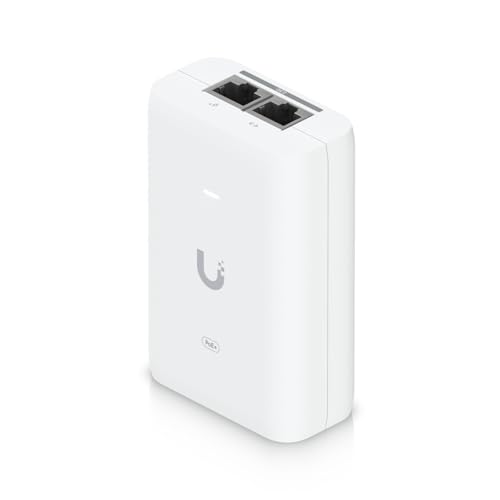
Ubiquiti PoE+ Adapter 30 W (UACC-POE+-2.5G)
Default UniFi PoE+ injector. 2.5 GbE, 30 W, Wi-Fi 6-ready.
Single-port 802.3at PoE+ injector. 2.5 Gbps data rate matches newer UniFi APs. Use it to power a U6 Lite/Pro, a camera, or an outdoor AP when you don't have a PoE switch.
Best for: Powering a single UniFi AP or camera where no PoE switch exists.
- 2.5 Gbps data rate
- 802.3at standard PoE+
- Compact
- Separate wall-wart (not in the box)
- Standard
- 802.3at
- Power
- 30 W
- Data
- 2.5 GbE
Install: step by step
1. Trace your coax
Walk the property and confirm the coax actually goes from the house to the barn. Old plans often lie. Look at:
- The house exterior, where cable enters
- The barn exterior, where cable enters
- Any splitters, barrel connectors, or junction boxes along the way
If it's buried, the ends are usually where it surfaces (near a utility pole, up the side of a building). The goal of this step is to identify the two end points you'll be plugging into.
2. Test continuity and basic health
The quickest test: connect a cheap coax continuity tester (a few dollars on Amazon) or a cable tester to both ends and confirm signal passes. If you don't have one, you can use the MoCA adapters themselves as the test — if the adapters show a bad link after install, your coax is the problem.
Things that kill a coax run:
- Corrosion at connectors (green fuzz, tarnish). Cut and re-terminate with new compression F-connectors.
- Water in the cable. Direct-burial coax that got nicked over the years. Visible by kinks, brittle jacket, or simply testing the ends and seeing no signal. Replace with direct-burial quad-shield RG-6.
- Bad splitters. If there are any splitters in the path, they need to pass the MoCA frequency range (~1125 to 1675 MHz for MoCA 2.5). Most 5-1002 MHz splitters don't. Replace with a splitter rated for MoCA (look for "5-1675 MHz" on the label).
3. Install the PoE (Point-of-Entry) filter
If any coax in your house carries active cable-company service, find where that coax enters the building from the street. Unscrew the coax from whatever it's connected to, screw the PoE filter on, then screw the coax back onto the filter. Direction matters — look at the filter for the "to street" arrow.
Skip if your coax is fully isolated from the cable company (e.g. it's an old satellite-only run).
4. Plug in the adapters
At the house end:
- Connect the coax to the MoCA adapter's coax port.
- Connect the adapter's ethernet port to a LAN port on your router (or a port on a switch that's part of your home network).
- Plug in the power adapter.
At the barn end:
- Connect the coax to the other adapter's coax port.
- Connect the adapter's ethernet port to your switch / AP / device.
- Plug in power.
Wait 30 seconds. The adapters auto-pair. Look for the "link" LED on both. Done.
5. Test throughput
Run a speed test from a device on the barn side. If you're getting close to your home internet speed (or at least 500+ Mbps internal), you're good. If you're seeing 50–100 Mbps, that's a sign of coax quality issues.
Troubleshooting
Link LED is off.
Either the coax is broken somewhere, or a splitter in the path is blocking the MoCA frequency
range. Start at the adapters and work outward — connect the two adapters to a single short coax
jumper (6 ft) as a sanity check. If they link up, the issue is in the long run or the splitters.
Link is up but throughput is terrible.
Most common cause: splitters that don't pass MoCA frequencies. Swap them for MoCA-rated ones.
Second most common: corroded or damaged coax. Third: running two MoCA networks on the same coax
without distinct passwords.
Throughput drops off a cliff at certain times of day.
Interference from cable-company signals leaking onto your coax. Install the PoE filter if you
haven't.
Adapters show conflicting IPs or weird behavior.
MoCA adapters don't assign IPs themselves — they're just a bridge. The IPs come from
your router. If anything is weird, reboot the adapters, then reboot your router. Usually sorts
itself out.
Cost summary
| Item | Approx cost |
|---|---|
| ScreenBeam MoCA 2.5 2-pack | ~$160 |
| PPC MoCA PoE filter | ~$10 |
| UniFi Switch Flex Mini (if needed) | ~$29 |
| UniFi U6 Lite (if needed) | ~$99 |
| UniFi PoE+ injector (if no PoE switch) | ~$35 |
| Total with full barn Wi-Fi buildout | ~$330 |
| MoCA-only, just ethernet to the barn | ~$170 |
Compared to a point-to-point install (~$400 for the standard UniFi tier), MoCA is roughly half the money and a tenth of the install effort — if you have the coax.
Frequently asked questions
Does MoCA interfere with my cable internet or TV?
No. MoCA operates above the frequency range used by cable providers. The PoE filter keeps the two
networks isolated. Tens of millions of homes run MoCA and cable service on the same coax
simultaneously.
My coax goes through a splitter — can I still use MoCA?
Yes, but only if the splitter passes MoCA frequencies (5–1675 MHz). Standard TV splitters top out
at 1002 MHz and will kill your signal. Look for MoCA-rated or "full band" splitters.
Can I use MoCA 2.0 adapters instead of 2.5?
Sure. MoCA 2.0 bonded tops out around 1 Gbps. If that's plenty for your home connection, the
older adapters are cheaper and fine. 2.5 is the better buy if you're shopping new — the
price difference is small.
How long does a MoCA install last?
The electronics are trivially reliable — 10+ years isn't uncommon. The failure point is
usually the coax itself (rodents, water, corrosion) long before the adapters.
What if I don't have coax, but I do have old unused telephone wire?
That's a different technology (G.hn Powerline or old HomePlug). Performance is much worse
and we don't recommend it. Run point-to-point wireless instead.
Spotted something that's out of date, or tried this and want to tell us how it went? We read everything sent via the contact page.
Complete gear list
Everything mentioned in this guide, in one place.
Actiontec ScreenBeam Bonded MoCA 2.5 Adapter, 2-Pack (ECB7250K02)
Turn existing coax into a 2.5 Gbps ethernet backbone.
If your house and outbuilding are already connected by a run of coax (old TV cable, satellite, etc.), a pair of MoCA 2.5 adapters gives you up to 2.5 Gbps between them with zero digging. The ECB7250K02 ships as a starter kit with both ends in the box.
Best for: Properties with existing coax between buildings.
- No line-of-sight needed
- No digging
- Near-2.5 Gbps throughput
- Both ends included
- Requires existing coax
- Signal quality depends on cable/splitter condition
- Standard
- MoCA 2.5 (bonded)
- Throughput
- Up to 2.5 Gbps
- Ports
- 1x 2.5 GbE
PPC SNLP-1GCW MoCA PoE Coax Filter
$10 filter that keeps your MoCA signal off the neighborhood.
Screws onto the coax where it enters your house from the street. Blocks MoCA frequencies from leaking onto the cable company's network and absorbs interference from outside. Install one if you have any active cable-TV / internet coax service.
Best for: Any MoCA install on a house still connected to a cable provider.
- Cheap insurance
- Improves throughput and stability
- Five-minute install
- Easy to forget
Ubiquiti UniFi 6 Lite Access Point (U6-Lite)
Default UniFi AP for inside the barn.
Standard 802.3af PoE Wi-Fi 6 access point. Once your bridge brings ethernet into the barn, plug this into a PoE switch or injector and you have fast Wi-Fi over the whole building. Manage via any UniFi controller (Cloud Gateway, UDR, Self-Hosted).
Best for: Indoor Wi-Fi coverage in the destination building.
- Wi-Fi 6
- Standard 802.3af PoE
- UniFi controller (free) for config
- Not outdoor-rated
- PoE injector sold separately
- Wi-Fi
- Wi-Fi 6 (AX)
- PoE
- 802.3af
- Ports
- 1x GbE
Ubiquiti UniFi Switch Flex Mini (USW-Flex-Mini)
5-port managed gigabit switch the size of a credit card.
Tiny, cheap, managed. Ideal for the destination end of a PtP link when you just need to split one ethernet drop into a couple of devices (AP + camera + NVR). Powered by USB-C or PoE input. Runs under UniFi Network.
Best for: Small destination building where you only need 2–4 extra ports.
- Tiny and cheap
- Managed under UniFi
- USB-C or PoE powered
- Only 5 ports
- No PoE output
- Ports
- 5x GbE
- Power
- PoE input or USB-C
- Mgmt
- UniFi
Ubiquiti PoE+ Adapter 30 W (UACC-POE+-2.5G)
Default UniFi PoE+ injector. 2.5 GbE, 30 W, Wi-Fi 6-ready.
Single-port 802.3at PoE+ injector. 2.5 Gbps data rate matches newer UniFi APs. Use it to power a U6 Lite/Pro, a camera, or an outdoor AP when you don't have a PoE switch.
Best for: Powering a single UniFi AP or camera where no PoE switch exists.
- 2.5 Gbps data rate
- 802.3at standard PoE+
- Compact
- Separate wall-wart (not in the box)
- Standard
- 802.3at
- Power
- 30 W
- Data
- 2.5 GbE